
 Don't worry i'm sure it'll buff out...
Wednesday, 19 November 2008

calling the shots...
Just a quick post to list the shots we'd like to include in the flythrough sequence. Further shots and the final order are being established our head of story *drum roll please* Khalid!
So here's what we have so far (in no particular order)...
- Spider emerging out of the shadows from underneath a car (red eye visible through darkness)
- INTERACTION SHOT - spider rolling can
- INTERACTION SHOT - spiders crawling out and knocking bin over (need to consider angle for what and how much rubbish falls out
- Low angle shot looking up at the buildings destroyed (could cut to spiders looking up)
- Overhead (though not actually directly overhead, point of interest in buildings) with spiders walking past/up road (building sign swinging?)
- Spider crawling over rubble, slips/loses footing and knocks further rubble over OR spider walking over drain and slips down gap (not falls through though) have them picking themselves back up.
- INTERACTION SHOT - spiders touching/scanning lamppost causing its lights to flicker/go on...possible electrocution?
- C/U of a spider as the other spider crawls towards it
When shots are finalised the list will be updated, possible camera shots/pre-vis blocking/drawings added too if time permits.
Friday, 14 November 2008
When in doubt consult rednecks!
Heres that tutorial i was telling you (sarah+dan) about earlier. I havnt had time to try it myself yet, but if it work i imagine it will save us loads of time.
And this guy has a REALLY bad south american accent...
http://uk.youtube.com/watch?v=2Rra0iISZ5I
And this guy has a REALLY bad south american accent...
http://uk.youtube.com/watch?v=2Rra0iISZ5I
Thursday, 13 November 2008
Rubble
Had a quick go using Dans technique (painting object on a surface) and i think we got a winning method.

This is one block duplicated using the brush tool then i went in and manually rotated the blocks and moved them about. It still needs work, there are too many straight edges but thats because of the block i used. What u guys think?
Wednesday, 12 November 2008
Rubble Trouble
I'm gonna try out Yaniv's method of creating the rubble with a mel script, but for now in regards to matt's recent SOS call, thought I would post this link of a Maya tutorial I found:
http://en.9jcg.com/comm_pages/blog_content-art-113.htm
Painting objects on surfaces:
Firstly, you'll need to activate geometryPaint, so go Modify>Script Paint Tool options. On the Setup panel, type "geometryPaint" into the "Tool Setup Cmd" text field.
Then a pop up window will appear, type in the object you wish to paint (in the geometry box). Close this window. For example, I created a basic sphere so 'psphere1'.
Select the surface you wish to paint on, then click the small icon (Paint Scripts Tool) on the bottom left of your screen to re-invoke the tool.
Start painting the surface. If you want to change the settings of the brush, double click the same icon as before.
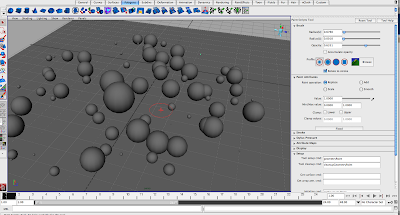
I haven't really experimented with this method, it seems to create random results. Im not too sure what potential it has, but its worth exploring it more...
http://en.9jcg.com/comm_pages/blog_content-art-113.htm
Painting objects on surfaces:
Firstly, you'll need to activate geometryPaint, so go Modify>Script Paint Tool options. On the Setup panel, type "geometryPaint" into the "Tool Setup Cmd" text field.
Then a pop up window will appear, type in the object you wish to paint (in the geometry box). Close this window. For example, I created a basic sphere so 'psphere1'.
Select the surface you wish to paint on, then click the small icon (Paint Scripts Tool) on the bottom left of your screen to re-invoke the tool.
Start painting the surface. If you want to change the settings of the brush, double click the same icon as before.

I haven't really experimented with this method, it seems to create random results. Im not too sure what potential it has, but its worth exploring it more...
Saturday, 8 November 2008
There's a MEL script to randomize keys on the graph editor. This might be an effective way to creatbe rubble
Modelling done


Hey, my part of the modelling is done, unless there's something you feel needs to be improved on.
 I'm exploring lighting and texturing today, so I'll be able to be of assistance on that front.
Subscribe to:
Posts (Atom)
